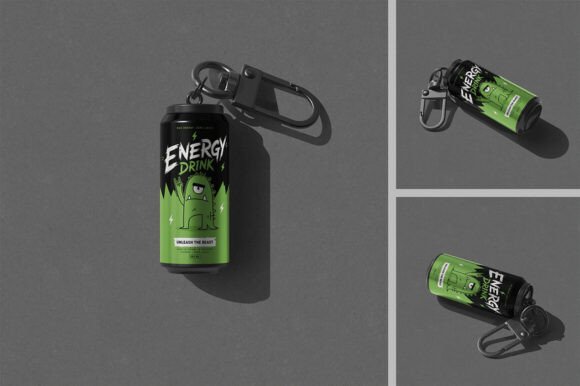
Mini Can Keychain Mockup with Carabiner Clip
Showcase Your Brand with a Compact, Versatile Design Tool
For designers, marketers, and business owners looking to present custom merchandise, the Can Keychain with Carabiner Clip Mockup offers a practical and visually appealing solution. This high-quality 3D mockup replicates a miniature can keychain complete with a durable carabiner clip, making it ideal for previewing branded promotional items, creative accessories, or small-batch product lines.
Whether you're designing for a client or preparing your own product visuals, this mockup simplifies the process of visualizing how your artwork will appear on a real-world object. Its realistic rendering and customizable features help you produce professional-grade images without the need for physical prototypes or expensive photoshoots.
Key Features That Make a Difference
- Three PSD File Variants – Choose from different display styles to match your presentation needs
- High-Resolution Output – At 3500x3500 pixels and 300dpi, your visuals will look crisp and detailed
- Smart Object Editing – Easily drop in your designs using smart layers for quick updates
- Organized Layer Structure – Makes navigation and customization straightforward, even for complex edits
- Customizable Backgrounds – Swap out scenes to suit your brand's tone or target audience
These features combine to create a streamlined workflow that supports both creative experimentation and efficient production. The mockup's attention to detail—such as the metallic sheen of the can surface and the subtle texture of the carabiner clip—adds a level of realism that enhances the perceived value of your design.
Practical Uses Across Industries
The Can Keychain with Carabiner Clip Mockup is more than a design tool—it's a versatile asset that can be used in a variety of professional and creative contexts.
Marketing and Branding
Brands launching new merchandise or preparing for trade shows can use the mockup to visualize keychains that feature their logo or campaign artwork. It allows for quick revisions and multiple design iterations, helping teams finalize the best version before production.
Product Development
Entrepreneurs and small business owners can create mockups to pitch their product ideas to investors or manufacturers. The realistic visuals help communicate the final product's appearance and quality without the need for a physical sample.
Educational and Creative Projects
Design educators can incorporate this mockup into lessons on branding, packaging, or product visualization. Students benefit from working with industry-standard tools that mirror real-world workflows.
Digital and E-Commerce
Online sellers can generate clean, professional product images for listings or social media content. With the ability to customize backgrounds and finishes, it's easy to align visuals with the brand's digital aesthetic.
How to Use the Mockup Effectively
Using the Can Keychain with Carabiner Clip Mockup is straightforward:
- Open the desired PSD file in Adobe Photoshop
- Locate the Smart Object layer for the label or metal finish
- Edit the layer by double-clicking, then paste or design directly onto the layer
- Save and close the Smart Object to update the mockup in real time
- Export the final image for use in presentations, marketing, or sharing
The included help file walks users through each step, ensuring even those new to mockup files can get started quickly. For best results, align your design with the provided label dimensions and test how your artwork looks in different mockup styles before finalizing.
Choosing the Right Style
Each of the three PSD files included offers a slightly different presentation style. One may feature a minimalist white background ideal for e-commerce, another a lifestyle scene for marketing visuals, and a third a flat lay setup for editorial or portfolio use. Selecting the right version for your purpose ensures your design is presented in the most compelling way.
Design Considerations for Maximum Impact
While the mockup simplifies the visualization process, thoughtful design choices will elevate your final output:
- Label Design – Keep text and logos centered and uncluttered to ensure visibility on a small surface
- Color Contrast – Choose color combinations that stand out against the metallic finish of the can
- Metal Finish Options – Experiment with brushed, polished, or matte effects to match your brand's aesthetic
- Background Harmony – Select or create backgrounds that complement your design without overpowering it
Also consider how the carabiner clip integrates into the design. If the keychain is intended for promotional use, positioning the clip in a way that suggests utility or portability can reinforce the product's value.
Why This Mockup Stands Out
In a market saturated with generic templates, the Can Keychain with Carabiner Clip Mockup distinguishes itself through its attention to detail, ease of use, and professional-grade output. Unlike flat or low-resolution alternatives, this 3D mockup delivers depth and realism that help your design stand out—whether you're presenting to a client, launching a product, or updating your portfolio.
Its compatibility with Photoshop's Smart Object feature ensures that even complex edits remain non-destructive and easy to adjust. And because the layers are clearly labeled and organized, you can jump in and start customizing without spending time untangling file structures.
Final Thoughts and Recommendations
If you're involved in product design, branding, or digital marketing, investing in a high-quality mockup like the Can Keychain with Carabiner Clip Mockup can significantly enhance your workflow and presentation quality. It's especially valuable for those who need to visualize small promotional items quickly and professionally.
For best results, keep your design focused, test across all three PSD styles, and always align your visuals with your brand's tone and audience expectations. Whether you're a freelancer presenting to a client or a business owner launching a new product line, this mockup gives you the tools to showcase your ideas with confidence and clarity.