Cover Handbook: A Practical Guide to Professional Product Presentation
Creating a compelling visual presentation for your product designs is essential, especially in today's competitive digital landscape. Whether you're a graphic designer, business owner, or creative entrepreneur, the Cover Handbook offers a streamlined solution for showcasing your work with precision and professionalism. Built around high-quality 3D mockup templates, this resource helps you visualize your designs in real-world contexts, saving time while elevating your presentation quality.
What is the Cover Handbook?
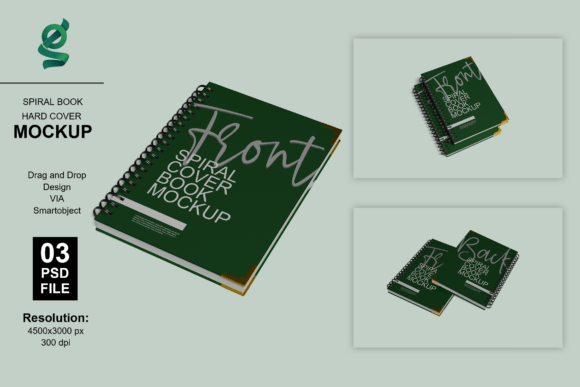
The Cover Handbook is a collection of 3D mockup templates designed for product visualization, particularly for notebooks, business cards, and cover designs. It includes six Adobe Photoshop files (PSD) that allow users to insert their designs with a single click using Smart Object layers. This makes it easy to generate high-resolution visuals without the need for advanced 3D modeling skills.
- 6 fully editable PSD files for notebooks, business cards, and covers
- Smart Object support for quick and accurate design placement
- Customizable background colors and lighting adjustments
- High-resolution output at 4500x3000 pixels and 300 dpi
- Well-organized layers for easy navigation and editing
How Does the Cover Handbook Work?
Using the Cover Handbook is straightforward. Each PSD file contains Smart Object layers that act as placeholders for your designs. Simply double-click the Smart Object layer in Adobe Photoshop, paste your design into the designated area, save, and close the tab. The design will automatically update in the 3D mockup, giving you a photorealistic preview of your final product.
- Open the PSD file in Adobe Photoshop
- Locate and double-click the Smart Object layer
- Paste your design into the editing window
- Save and close the Smart Object tab
- View your updated 3D presentation in the main canvas
It's important to note that any model images or photographs used in the preview are for presentation purposes only and are not included in the final file. Users are expected to have Adobe Photoshop installed to take full advantage of the features offered by the Cover Handbook.
Who Benefits from Using the Cover Handbook?
The Cover Handbook is especially useful for:
- Graphic designers looking to showcase branding materials, stationery, or packaging concepts
- Business owners who need professional visuals for product listings or marketing materials
- Freelancers aiming to present polished portfolios to potential clients
- Online sellers who want to enhance their product images on e-commerce platforms
Whether you're designing a logo for a new startup or preparing print-ready materials for a client, the Cover Handbook provides a fast and effective way to visualize your work in a realistic setting.
Real-World Applications of the Cover Handbook
Let’s explore a few practical scenarios where the Cover Handbook can make a difference:
- Client presentations: Impress clients with photorealistic mockups that clearly show how your design will look in physical form.
- E-commerce product listings: High-quality images increase consumer trust and conversion rates. Use the Cover Handbook to generate clean, professional product visuals for your online store.
- Portfolio development: Stand out from the crowd by presenting your work in a visually engaging format that mimics real-life applications.
- Social media marketing: Create eye-catching visuals for Instagram, Pinterest, or Facebook to promote your latest design projects.
Strengths and Considerations of the Cover Handbook
One of the key strengths of the Cover Handbook is its ease of use. The Smart Object functionality allows even beginners to produce professional-grade mockups without needing to master complex 3D software. Additionally, the high-resolution output ensures that your visuals are print-ready and suitable for both digital and physical applications.
However, there are a few considerations to keep in mind:
- Adobe Photoshop is required: Since the templates are in PSD format, you'll need access to Adobe Photoshop to edit them effectively.
- Limited customization: While you can adjust lighting and background colors, the overall 3D scene is pre-rendered, so you can't make structural changes to the mockup itself.
- Learning curve for Smart Objects: If you're new to Photoshop, there may be a brief learning curve before you're comfortable using Smart Object layers efficiently.
Is the Cover Handbook Right for Your Project?
When evaluating whether the Cover Handbook fits your needs, consider the following factors:
- Do you need fast, professional mockups? If yes, this resource is ideal for quickly generating high-quality visuals without the need for 3D rendering expertise.
- Are you working with notebook covers, business cards, or similar print media? The templates included are specifically designed for these formats, making it a perfect match for related projects.
- Do you have access to Adobe Photoshop? Without Photoshop, you won’t be able to take advantage of the Smart Object features, so this is a critical requirement.
If you're looking for a more flexible or customizable 3D environment, you may want to explore full 3D modeling software. However, for most design professionals and small business owners, the Cover Handbook offers a practical and cost-effective solution.
Final Thoughts
In a world where visual presentation plays a crucial role in marketing and client engagement, tools like the Cover Handbook offer a valuable shortcut to professional results. By combining high-resolution mockups with user-friendly editing features, it empowers designers and business owners to showcase their work confidently and efficiently.
Whether you're building a portfolio, launching a product line, or pitching to clients, the Cover Handbook gives you the tools to present your designs in the best possible light—without the hassle of complex 3D software or time-consuming rendering processes.