Laser Cut Vintage Welcome Sign: A Timeless Addition to Your Home or Project
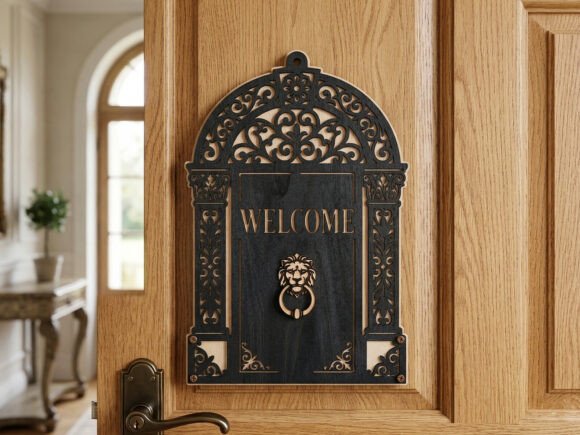
For those looking to add a touch of classic elegance to their home entrance or create a standout piece for their creative business, the Laser Cut Vintage Welcome Sign is an excellent choice. This intricately designed 3D layered sign features antique-style filigree scrollwork, a majestic lion head knocker, and a timeless "Welcome" message, all crafted through a precise 100-cut laser design. It’s ideal for laser cutting machines like Glowforge, xTool, and Lightburn, as well as CNC routers, making it accessible to both hobbyists and professionals.
What Makes the Laser Cut Vintage Welcome Sign Unique?
This design stands out due to its combination of aesthetic appeal and functional versatility. It consists of two layers: a solid arch backer and a detailed top frame that includes the decorative elements and text. When layered together, the result is a rich, dimensional piece that can be used as a front door hanger, porch decor, wall art, or even a memorable housewarming gift.
The design comes in a 12 x 12 size but can be resized to suit different needs. The package includes AI, EPS, SVG, PNG, PDF, and DXF file formats, ensuring compatibility with a wide range of design and cutting software. As a digital download, it offers instant access and eliminates shipping delays.
Common Mistakes to Avoid When Working with This Design
While the Laser Cut Vintage Welcome Sign is a high-quality template, there are several common pitfalls users encounter that can affect the final outcome. Being aware of these can help you make the most of your project.
1. Assuming Resizing Won’t Affect Cut Quality
Although the design can be resized, doing so without considering the material thickness or laser machine capabilities can lead to misaligned layers or fragile components. For example, scaling down the lion head detail too much might cause the laser to struggle with small, intricate cuts, resulting in incomplete or burned edges.
Better approach: Always test the resized design on scrap material first. If you're using a lower-powered laser, consider keeping the original size or only slightly adjusting it to maintain structural integrity.
2. Ignoring Material Compatibility
Many users assume that any wood or acrylic sheet will work, but the type and thickness of material can greatly influence the final look and durability. Thin or low-quality wood may warp or break during assembly, especially with the delicate scrollwork included in this design.
Better approach: Use 1/8” to 1/4” Baltic birch plywood or high-quality acrylic for best results. These materials hold fine details well and provide the necessary rigidity for a 3D layered sign.
3. Skipping the Layer Test
Some creators jump straight into cutting the final product without testing how the layers align. Since this design involves two distinct layers, misalignment can ruin the visual impact and require additional time and materials to correct.
Better approach: Run a quick alignment test by cutting one of each layer on inexpensive material. Check how the top layer sits over the backer before committing to your final material.
4. Overlooking File Format Compatibility
Although the design includes multiple file formats, not all software handles them the same way. Some users have reported issues with SVG files not importing correctly into certain laser software, especially if the program doesn’t support embedded fonts or complex vector paths.
Better approach: Before starting, open the file in your laser software to ensure it reads all layers and paths correctly. If you encounter issues, try converting the design to DXF or PDF, which tend to be more universally compatible.
5. Underestimating Assembly Time
Due to the layered nature of the design, some users are surprised by how long the assembly process can take—especially if they're not experienced with glue application or layer alignment.
Better approach: Plan your assembly ahead of time. Use small clamps or tape to hold pieces in place while glue dries. Consider using a fast-drying wood glue or adhesive that’s appropriate for your material to speed up the process.
Choosing the Right Tools and Settings
Another often-overlooked aspect is ensuring that your laser machine settings are properly calibrated for the material and design complexity. The Laser Cut Vintage Welcome Sign has over 100 cuts, which can be taxing on a machine if the power and speed settings aren’t optimized.
- Power: Start with 80–90% power for 1/8” wood, adjusting based on your machine’s capabilities.
- Speed: Begin around 1000–1200 mm/min and adjust if cuts are incomplete or too dark.
- Focus: Make sure your laser head is properly focused to maintain clean cuts, especially in intricate areas like the lion’s details.
Incorrect settings can lead to charring, incomplete cuts, or even damage to your material. Taking a few minutes to test on scrap material can save you time and materials in the long run.
What to Check Before Downloading or Purchasing
Before you commit to downloading the Laser Cut Vintage Welcome Sign, consider the following:
- File Integrity: Ensure the ZIP folder contains all listed file formats (AI, EPS, SVG, PNG, PDF, DXF).
- Layer Separation: Open the design file to confirm that the two layers (backer and detailed top) are clearly separated and labeled.
- Software Compatibility: Confirm that the files work with your specific laser software (e.g., LightBurn, RDWorks, or CorelDRAW).
- Customer Support: Check if the seller offers support in case you encounter issues with the download or file use.
Final Thoughts
The Laser Cut Vintage Welcome Sign is a versatile and beautiful design that can elevate your laser cutting projects. Whether you're crafting for personal use or creating items to sell, this template offers both aesthetic appeal and practicality. However, like any digital design, its success depends on thoughtful preparation, material selection, and attention to detail during both cutting and assembly.
By avoiding common mistakes and taking the time to test and adjust your approach, you’ll be able to produce a stunning, professional-quality sign that stands out. And with the flexibility to resize and customize, the Laser Cut Vintage Welcome Sign is a worthwhile addition to any maker’s digital design library.